Save. Drive. Live. Offline. Anytime. Anywhere. v1.2.1 adds a live drive map, per-waypoint markers, hands-free Siri, iCloud sync, and accessibility.
Efficiver — Efficient + Driver.
Save. Drive. Live.
Offline. Anytime. Anywhere.
Real-time driving feedback that runs entirely on your iPhone. No insurer dashboard. No data leaving your device. Just your drive, scored in real time, every trip.
Efficiver is built for drivers who care about how they drive. The Efficiency Score updates live as you drive, blending speed, acceleration, idle time, gear use, route choice, and weather. Save a session and see exactly where the orange and red markers landed on the map — and what to do differently next time.
WHAT YOU GET
Real-time Efficiency Score
A single live score that reflects how efficient your driving is, second by second. Calibrated to your vehicle on first setup.
Interactive drive map
Full-screen Apple Maps view that follows you smoothly as you drive. Pinch to zoom, two-finger drag to rotate. Per-waypoint event markers (green / orange / red) show exactly where each acceleration or braking event happened — on the live map AND on the past-trip Route card.
Hands-free Siri voice control
"Hey Siri, start drive in Efficiver." Drive starts immediately in the background. Open Efficiver once during the drive to see the Live Activity on the Dynamic Island and Lock Screen and tap Stop from there. "Hey Siri, stop drive in Efficiver" saves and speaks your Efficiency Score.
Wallet Watch
See your fuel and CO₂ cost in your local currency, per session and per month. Set fuel prices once; Efficiver does the math.
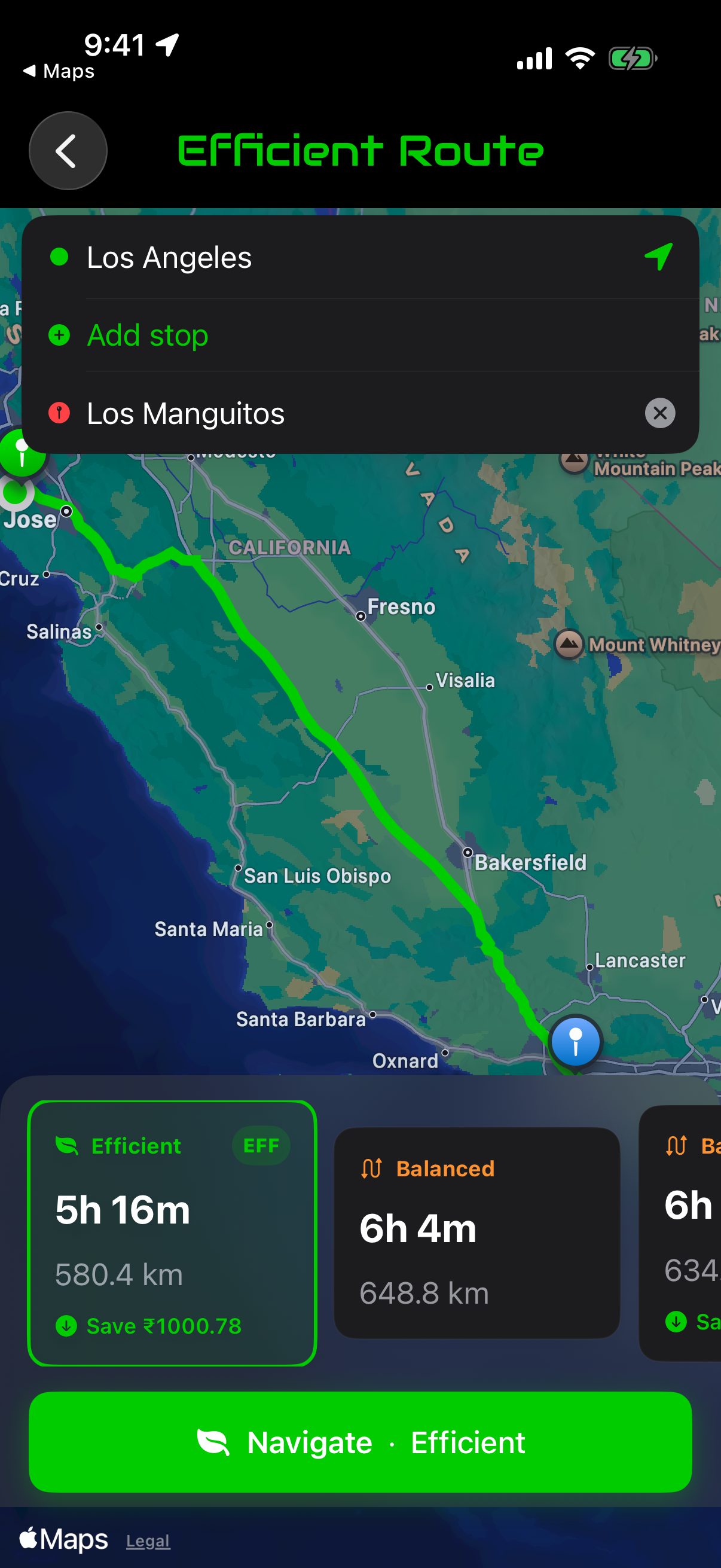
Efficient Route
Pick the route that scores best for efficiency, not just speed. Side-by-side comparison before you start driving.
Smart Detection (on-device ML)
Efficiver learns your engine's signature with Apple's machine-learning frameworks. Runs entirely on the Apple Neural Engine — no cloud calls, no model uploads.
iCloud sync
Your sessions and the trained model sync across your iPhones and iPad via your own iCloud account.
Voice guidance + haptics
Audio cues for engine start, drive stop, save complete. Coordinates with VoiceOver so screen-reader users hear clean announcements without speech collision.
Low Power awareness
When iPhone is in Low Power Mode, the live map pauses and a clear placeholder appears — Efficiver respects your battery setting.
ACCESSIBILITY
Efficiver is built accessibility-first:
• Full VoiceOver support across every screen
• Dynamic Type from default through AX5
• Reduce Motion respected on all animations
• Reduce Transparency respected on Material backgrounds
• Differentiate Without Color (every color-coded marker has a shape or text label)
• Bold Text supported throughout
• Smart Invert friendly
• Lifecycle announcements (Drive started, Drive stopped, Drive saved)
PRIVACY
Everything runs on your iPhone. The Smart Detection model is trained on-device using Apple's frameworks. GPS waypoints are stored locally in SwiftData. iCloud sync uses your private iCloud database — no shared records, no third-party servers, no advertising IDs. We can't see your drives, and we don't want to.
REQUIREMENTS
iPhone running iOS 26 or later. iPad supported. iCloud account required for cross-device sync (optional).
Save. Drive. Live. Offline. Anytime. Anywhere.
Chrome-Stats does not own this Apple app. Please use these information below to contact the Apple app developer.

 English
 Español
 Français
 Português
 日本語
日本語 简体中文
简体中文 한국인
한국인







 (0)
(0)