
 English
 Español
 Français
 Português
 日本語
日本語 简体中文
简体中文 한국인
한국인


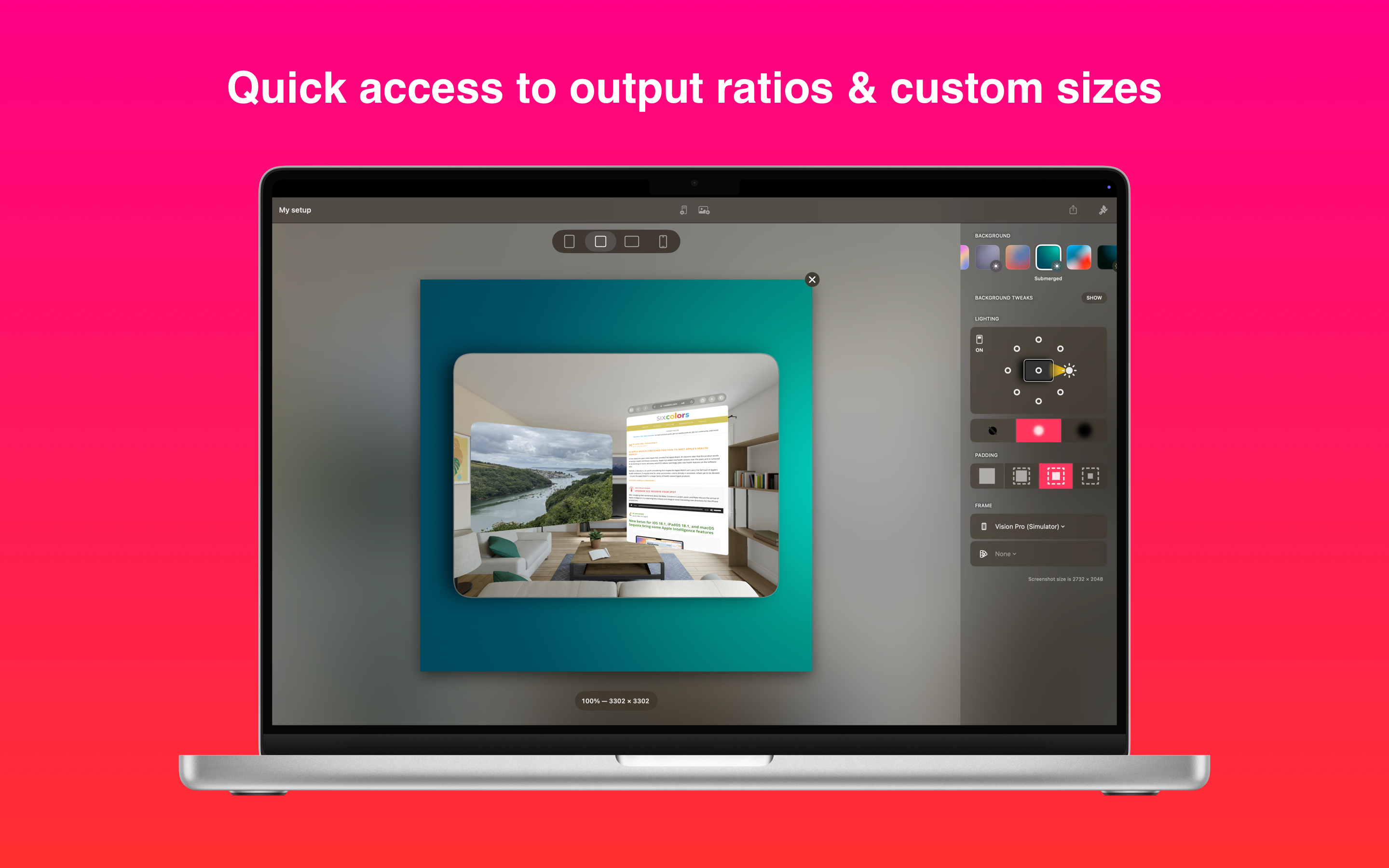



Características y capacidades
Crecimiento de usuarios y estadísticas de descarga
- Por:
- Montana Floss Co.
- Calificación:
- 4.70 (83)

- Versión:
- 1.4.6 Última actualización: 2026-05-12
- Código de versión:
- 885566207
- Fecha de creación:
- 2024-08-13
- Dispositivos compatibles:
- Tamaño:
- 185.71MB
- URLs:
- Sitio web ,Política de privacidad
- Descripción completa:
- Ver descripción detallada
- Fuente:
- Apple Apps Store
- Datos ingeridos el:
- 2026-06-03
- Comparar estadísticas y clasificación:
- Frame Screenshots: Shareshot vs Frame Screenshots & Videos
- Frame Screenshots: Shareshot vs SnapScreen: Screenshot Editor
- Frame Screenshots: Shareshot vs BetterShots - Edit Screenshots
Clasificación
Para desarrolladores
Contacta con el desarrollador
Chrome-Stats no es propietario de este App de Apple. Utilice esta información a continuación para ponerse en contacto con el desarrollador de App de Apple.
Opiniones de usuarios
Users praise Shareshot for being easy to use and effective at producing well-framed screenshots, with strong Shortcuts integration and versatile background options. However, recurring drawbacks include a subscription pricing model versus a one-time purchase, limited frame selection (auto-detect only, recent models only, missing Air), Pro gating of frame packs, occasional reliability issues with Take Screenshot/Shortcuts detection and frame matching, and a watermark in the free version. Overall, the app is solid for rapid framing, but pricing and framing limitations affect long-term appeal. Ventajas
- Easy to use and straightforward to operate.
- Helps produce well-framed screenshots, making sharing and previews easier.
- Strong Shortcuts integration and automation compatibility.
- Background variety and frame customization enhance preview quality.
- Active, responsive development with updates that address user feedback.
Contras
- Subscription pricing is a major complaint; many users prefer a one-time purchase or lifetime unlock.
- Limited frame selection: auto-detect only, no manual frame picker, and frames tied to recent iPhone models (missing iPhone Air).
- Some features (frame packs) and options are gated behind Pro, limiting accessibility.
- Occasional reliability issues (e.g., Take Screenshot/Shortcuts detection and frame matching).
- Free version displays a watermark, which users want removed without Pro.
Reseñas recientes
Love it

por T1*****, 2026-02-28
It’s a really cool app, and it’s very well-made. I just think bundling a subscription for something that like this that has a very singular function is really silly. Just let someone pay one time like $20 or something for a lifetime access to that. Even an app like Flighty that’s way more popular allows for a lifetime access option. Also, the frames are limited to the most recent iPhones, but don’t include the iPhone Air. Overall, I just think another subscription is lame.

por Ap*****, 2025-10-14
Big fan of this app! I wish Apple didn’t have such a limited memory window so the share to worked better. But that’s apples fault. This thing is rock solid.
por Ka*****, 2025-10-10
Mejores alternativas Frame Screenshots: Shareshot
Aquí hay algunas Apple apps que son similares a Frame Screenshots: Shareshot:


Frame Screenshots & Videos
Patzer LLC
0.00  (0)
(0)
(0) 
SnapScreen: Screenshot Editor
An Han
0.00 (0)
(0) 
BetterShots - Edit Screenshots
Muhammad Masykur
0.00 (0)
(0) 
Shotbot - Framed Screenshots
Richard Witherspoon
0.00 (0)
(0) 
Frame It Up
OH BOY Labs, LLC
0.00 (0)
(0) 
Shots - Screenshot Beautifier
Gautam Singh Rathor
0.00 (0)
(0) 
NeoShot - Beautiful screenshot
Xi'an Jianqu Technology Co., Ltd.
0.00 (0)
(0) 
Mockup Frame-Screenshot Bezel
文阳 贺
5.00 (3)
(3) 
Screen Shot App - ZapShare
Adam Fahlman
3.00 (2)
(2) 
App Screenshot Generator
Binh An Tran
0.00 (0)
(0) 
Screenshot Maker - Mockup Pro
YUSEI NISHIMIYA
0.00 (0)
(0) 
ShotEdit: Screenshot Frame Pro
Ki Tat Chung
0.00 (0)
(0)