 English
 Español
 Français
 Português
 日本語
日本語 简体中文
简体中文 한국인
한국인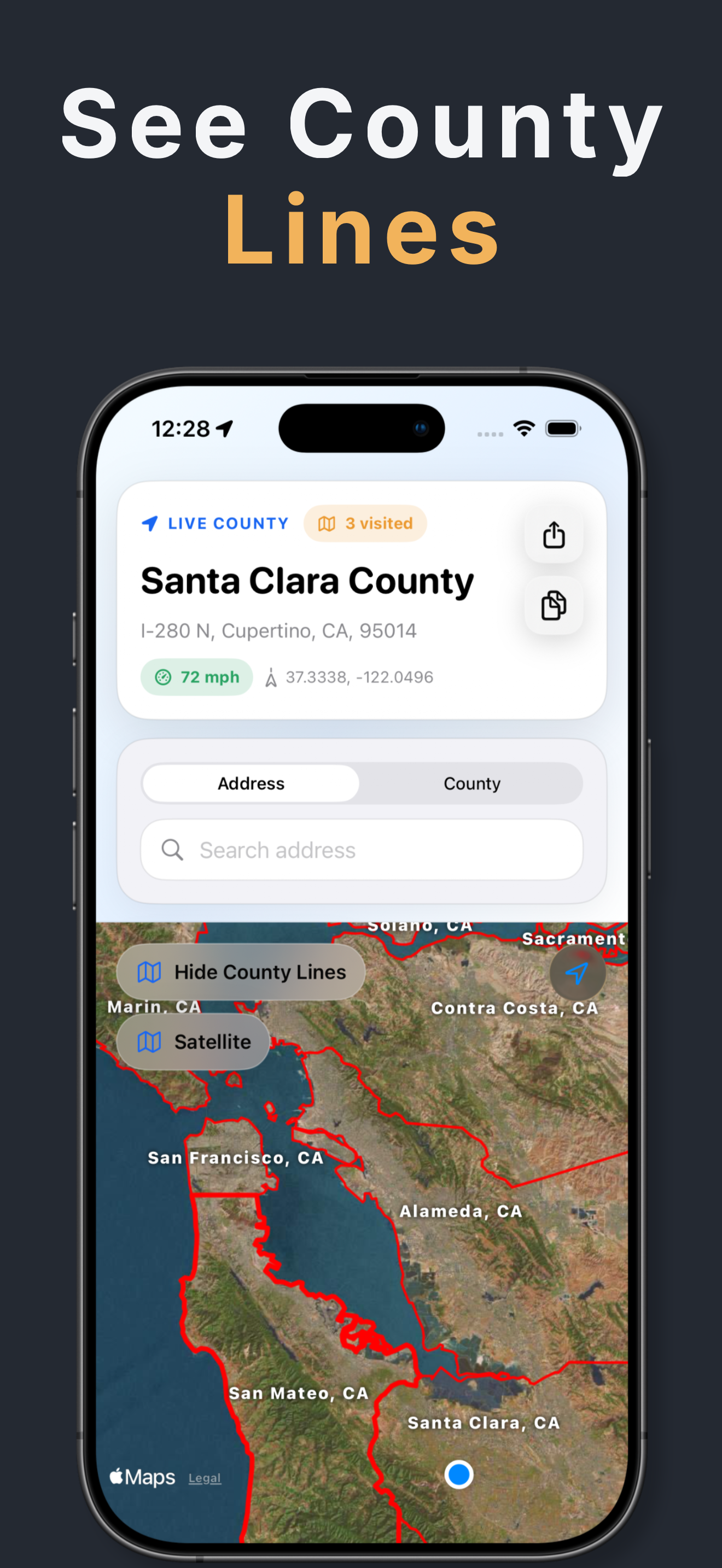



Features & Capabilities
User Growth & Download Statistics
App
- By:
- Patzer LLC
- Rating:
- 4.30 (19)
 1 new ratings
 - Version:
- 3.5 Last updated: 2026-06-04
- Version code:
- 886546269
- Creation date:
- 2023-12-14
- Compatible devices:
- Size:
- 35.71MB
- URLs:
- Website ,Privacy policy
- Full description:
- See detailed description
- Source:
- Apple Apps Store
- Data ingested on:
- 2026-07-02
- Compare stats and ranking:
- County Names & Lines vs CountyTracker
- County Names & Lines vs Where Am I - Find My Address
- County Names & Lines vs Property Line Finder
For Developers
Contact the developer
Chrome-Stats does not own this Apple app. Please use these information below to contact the Apple app developer.
User Reviews
Free version of the app has zoom limitations is difficult to read and locks you out after a couple minutes unless you pay.


by No*****, 2026-04-11
I paid $2.99 to be able to view county lines, but the labels are so big that they severely limit the utility of the app/layer.
Town names are in 8pt font the way they are on Google and Apple Maps. But the county names are in 20pt font, and they don’t shrink when you zoom out. I wish reviews allowed you to post screenshots, because the zoomed out view of the state of Virginia is just a block of a ton of large county labels layered over one another so you genuinely can’t make out any of them.
Please! Make the county name labels responsive to zooming in/out, and please either add a toggle to change the font size from big to small or just make them ~10-12pt font consistently. I don’t think that this would be a difficult patch!
With that, please add a toggle to make the county lines thinner, or make the lines responsive to zoom also.
Lastly, it would be very helpful if you could view the county names written along the lines when you’re zoomed in, like the way state lines are shown on Google/Apple Maps. As it stands, you have to zoom out to view the labels when you’re looking at a county line. But don’t zoom out too far, or you won’t be able to read it at all.
Also, if you added polygons for town boundaries, park boundaries, etc, lines for streets (so you can highlight an entire road instead of only one point on it) + the ability to search by place names (ie “Baltimore Washington International Airport” or “Shenandoah National Park”) I would be happy to pay a monthly subscription fee, because the app would become enormously useful to me.
As of now, it’s not even worth the one-time purchase at $2.99 because the labels are so badly done. I want them fixed or I want my money back.
by Ch*****, 2025-07-10
I wanted to be able to see counties easily which the app easily does. In app purchase make it easy to review the county borders.
I asked developer if he could add ability to search an address to plot it on the map to easily see the county and view its marker on the map.
He replied and thanked for the ideas and implemented quickly.
This app allows me to get county info without having to do a separate search separately on websites.
Thank you for the app!
Warm Regards
by md*****, 2025-01-25
Best County Names & Lines Alternatives
Here are some Apple apps that are similar to County Names & Lines:

CountyTracker
Burke Rosen
0.00  (0)
(0)
(0) 
Where Am I - Find My Address
GlassWave LLC
4.80 (3,534)
(3,534) 
Property Line Finder
Biographics Consultoria e Design LTDA
4.20 (970)
(970) 
Where Am I At? - GPS
margaret kovatch
0.00 (0)
(0) 
CivicMapper
Great Sitkin Technologies LLC
5.00 (3)
(3) 
Property Line Finder - GPS Map
Free App Studio
4.00 (281)
(281) 
Where Am I - Location
Andrea Montinovo
4.80 (5)
(5) 
Property Line Finder Map
Thinkabout
4.00 (25)
(25) 
Address Finder: Where Am I?
Patzer LLC
4.80 (17)
(17) 
Where Am I? - Locality Info
BigDataCloud
4.80 (41)
(41) 
Property Line Finder -GPS Maps
怡 左
4.30 (124)
(124) 
Localizer - Where am I
Paul Steinhilber
4.50 (11)
(11)