
 English
 Español
 Français
 Português
 日本語
日本語 简体中文
简体中文 한국인
한국인


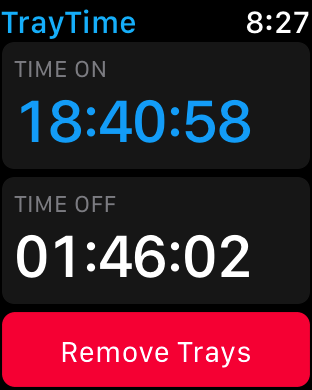
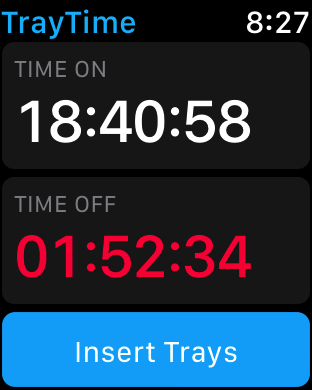
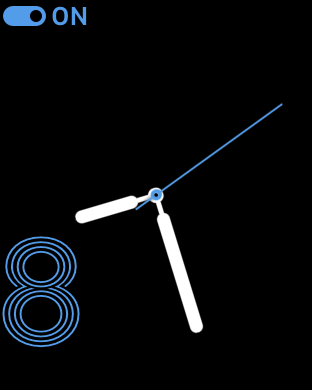

Features & Capabilities
User Growth & Download Statistics
App
- By:
- Pocketglow LLC
- Rating:
- 4.10 (40)

- Version:
- 1.0.3 Last updated: 2018-01-08
- Version code:
- 841784366
- Creation date:
- 2017-10-23
- Compatible devices:
- Size:
- 34.78MB
- URLs:
- Website
- Full description:
- See detailed description
- Source:
- Apple Apps Store
- Data ingested on:
- 2026-07-02
- Compare stats and ranking:
-
For Developers
Contact the developer
Chrome-Stats does not own this Apple app. Please use these information below to contact the Apple app developer.
User Reviews
TrayTime is praised for its simple interface and strong timer-based tracking, including Apple Watch support and historical wear data. It helps users stay on target with daily wear hours and provides convenient logging. Recurrent criticisms center on missing reminders, paid feature upgrades, and occasional data-recording glitches that affect accuracy. Pros
- Easy-to-use, simple and straightforward interface.
- Reliable timer with editable in/out times that keeps wear tracking accurate and honest.
- Works well with Apple Watch and offers quick iPhone/home screen access for logging.
- Built-in historical tracking to review past wear and progress.
- Helpful for staying on track to meet daily wear hours (20–22 hours) and reviewing progress.
Cons
- Lack of reminders/notifications to reinsert trays or stop the timer, a feature repeatedly requested by users.
- Some features require paying for a premium/upgrade, which is a downside for some users.
- Occasional data-recording glitches (e.g., last wear time not captured) that may require manual adjustments.
Recent reviews
Could use an alarm to insert aligners say like 1 hour after removing them. The timing could vary by user.
Could use a notes section.


by Ca*****, 2026-03-14
I downloaded the Invisalign tracking app when I got my Invisalign trays. It was really, really bad. It did not allow you to edit an entry.
Then I found this one! Sooooo much better.
Great tracker app! Highly recommended.
by Dr*****, 2024-03-13
This app avoids some of the UX pitfalls of other aligner apps, but creates some new ones. It’s easier to edit time in / out, if you forget to start/stop the timer in the app, but you have to enter the upper and lower aligner number separately, which seems unnecessary since they are almost always the same (I have yet to hear of a use case where someone has to wear different upper and lower aligner numbers simultaneously).
There’s also no way to see how many days you’ve been wearing a specific aligner set / number.
Suggested features:
- Indications of how many more days you need to wear your aligners if you’re not meeting your 22/hour a day requirement for 7-day wear. E.g. “Based on your 20/hour a day wear time, it’s recommended that you wear this aligner set for 10 days.”)
- Gamification - Streaks or, ideally, indications of your wear duration / performance relative to other anonymized users. I struggle with the discipline of near-constant wear (shout out to my fellow snackers and coffee sippers), and some inspiration would help.
by Na*****, 2023-07-18
Best TrayTime Alternatives
Here are some Apple apps that are similar to TrayTime:

Aligner Wear Timer - Tray
Karol Jaworski
0.00  (0)
(0)
(0) 
Aligner Tracker - TrayTrack
RSApps Nordics
3.80 (18)
(18) 
TrayMinder
TrayMinder LLC
4.80 (5,124)
(5,124) 
Tray With Me (Aligner Tracker)
Yeung Seung Cho
0.00 (0)
(0) 
InviSmile
NIKHIL CHOWDARY NETTEM
0.00 (0)
(0) 
TrayOff
CRISTOPHER REY ENCARNACION
0.00 (0)
(0) 
Tray Day
Mark Remi
0.00 (0)
(0) 
Clear aligners tracker
Rowix
4.20 (18)
(18) 
TrayBuddy
五花八萌(广州)网络科技有限公司
1.00 (1)
(1) 
SmileDiary - Aligner Tracker
Nanjing Xiaowei Technology Co., Ltd.
0.00 (0)
(0) 
Smile Journey: Aligner Tracker
APPS FOR DENTISTS, MCHJ
0.00 (0)
(0) 
Max Align Track
Maxdenta Lab
2.00 (1)
(1)