


Email Magic
提供元: Mahesh Valu
Name: Email Magic – Smart Email Scheduler & Task Automator
Version: 1.1
Platform: Firefox
Description:
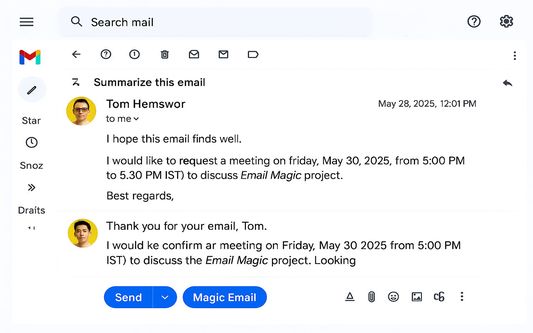
Email Magic is a smart browser extension that transforms your email inbox into an intelligent productivity hub.
 English
 Español
 Français
 Português
 日本語
日本語 简体中文
简体中文 한국인
한국인



特徴と機能
ユーザー成長とダウンロード統計
Manifest V2 Add-on
- 提供元:
- Mahesh Valu
- 日間ユーザー:
- -
- バージョン:
- 1.1.2 最終更新日: 2025-06-15
- バージョンコード:
- 5967931
- 作成日:
- 2025-06-09

- リスク:
- High risk impact Moderate risk likelihood
- 権限:
- ホスト権限:
- https://mail.google.com/
- https://www.googleapis.com/*
- https://mail.google.com/
- コンテンツスクリプトの一致:
- mail.google.com
- mail.google.com
- サイズ:
- 55.11KB
- URL:
- Webサイト
- 詳細説明:
- 詳細な説明を見る
- ソース:
- Firefoxアドオンストア
- データ取得日:
- 2026-06-20
- 統計とランキングを比較:
- Email Magic vs SmartEmail Assistant
- Email Magic vs Gmail Inbox Cleaner for Firefox
- Email Magic vs Gmail Email Template Manager and Auto-Respond
開発者に問い合わせる
Chrome-Stats はこの Firefoxアドオン を所有していません。以下の情報を使用して、Firefoxアドオン 開発者にお問い合わせください。
Email Magicは安全ですか?
リスク影響度
リスク影響度は、拡張機能がアクセスできる追加の権限のレベルを測定します。低リスク影響度の拡張機能は多くの害を及ぼすことができませんが、高リスク影響度の拡張機能はパスワードの盗難、セキュリティ設定の回避、個人データへのアクセスなど、多くの被害を与える可能性があります。高リスク影響度の拡張機能は必ずしも悪意があるわけではありません。しかし、悪意を持つようになると、非常に有害になる可能性があります。
Email Magicはブラウザとデータのセキュリティに影響を与える可能性のある機密権限をいくつか必要とします。インストール前に注意してください。
リスク影響度分析の詳細
- Critical Grants access to browser tabs, which can be used to track user browsing habits and history, presenting a privacy concern.
- Critical ******* ****** ** *** ********* ******** *********** **************
- High ******* ******* **** *** ****** ***** *** ***** ** ******* **** ********* ********* ** * *********** *****
リスク可能性
リスク可能性は、Firefoxアドオンが悪意を持つ可能性を測定します。これは、Firefoxアドオンストアにおける発行者とFirefoxアドオンの評判、Firefoxアドオンが存在している期間、およびFirefoxアドオンに関する他のシグナルによって決定されます。私たちのアルゴリズムは完璧ではなく、悪意のある拡張機能を検出する新しい方法を発見するにつれて変更される可能性があります。Firefoxアドオンをインストールする際には常に注意することをお勧めします。
Email Magicはおそらく信頼できます。可能であれば他の発行者を優先してください。このアドオンをインストールする際は注意してください。
リスク可能性分析の詳細
- High This extension has low user count. Unpopular extensions may not be stable or safe.
- Low **** ********* *** ******* **** **** * ****** **** ***** ******** *** **** ****** ** ** ****** *** *****
- Low **** ********* *** ***** **** **** * ****** **** ***** ********** *** **** ****** ** ** ****** *** *****

完全なリスク分析の詳細を見るにはアップグレードしてください
ベストのEmail Magic代替案
Email Magicに類似したFirefox add-onをいくつか紹介します:

SmartEmail Assistant
Thu
 - 0.00
  (0)
(0) 
Gmail Inbox Cleaner for Firefox
KreativeKoala LLC
89 3.00 (2) Gmail Email Template Manager and Auto-Respond
Aevorn LLC
- 0.00 (0) 
MagicTool AI Assistant
Magictool AI
73 3.40 (5) MailMyWork
Pradyumn Shirsath
- 0.00 (0) 
Slotify
Slotify Solutions Inc.
- 0.00 (0) 
Email Masker
Lukonet
8 0.00 (0) 
Smart Meeting Scheduler
xoilaclive
- 0.00 (0) 
AI Email Assistant
The AI's
3 3.00 (2) 
Inbox When Ready for Gmail™
Inbox When Ready
194 4.90 (82) 
Superemail | AI Email Assistant for Gmail™
Superemail
14 4.50 (2) 
Writingmate
Sin88
2 0.00 (0)