PDF Reader & Editor Tools Android

PDF Reader & Editor Tools

All-in-one PDF reader & editor: merge, sign, OCR, cloud, TTS, image tools.

Features & Capabilities

PDF Reader & Editor Tools is an all-in-one PDF reader, PDF editor, image toolkit & PDF viewer for Android. Open documents instantly, edit with pro tools, merge & split files, compress, sign, watermark, convert formats, and finish image jobs in one place. From quick viewing to deep edits, every workflow stays in one secure hub.

⭐ Fast, lightweight, and easy — built for students, teachers, office staff, and business professionals who need reliable PDF + image workflows every day.

🌍 Multi-language app UI: English, Spanish, German, French, Hindi, Portuguese, Indonesian, Russian, Turkish, Vietnamese, Chinese, Japanese, and Bengali.

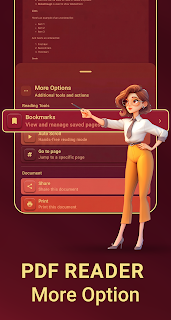
📖 PDF Reader & Viewer Smooth scrolling, quick open, full-text search, pinch & double-tap zoom, bookmarks & table of contents, reading themes (Light, Dark, Sepia, Black), and vertical or horizontal reading layouts.

🔊 Read aloud — Text-to-Speech (NEW) Listen to PDFs with playback speed control, curated voice styles, and on-screen reading highlights so you can follow along eyes-free.

☁️ Cloud storage (NEW) Link Google Drive, Dropbox, or Microsoft OneDrive to browse cloud folders, open PDFs, upload from your device, and download copies — always optional; you stay in control.

🛠️ PDF editing & utilities Merge PDFs, split by ranges, extract pages, compress for smaller files, rotate & reorder pages, remove, duplicate, or insert blank pages, crop/resize pages, add page numbers, headers & footers, text or image watermarks, password lock/unlock, digital signatures (draw, image, or typed), add text layers, fill forms, draw annotations, OCR for scanned text, image ↔ PDF conversion, built-in document scanner, detailed file metadata, and repair tools for damaged PDFs when possible.

📤 Advanced PDF (NEW) Export PDF to Microsoft Word (.docx), Excel (.xlsx), or PowerPoint (.pptx). Compare two PDFs in a synchronized, side-by-side viewer.

🤖 AI assistant (requires internet) Summarize long PDFs, ask questions with answers grounded in the document text, and translate the current page — handy for research and multilingual reading.

🖼️ Image tools (NEW) Compress JPG/PNG/WEBP with quality control, resize by pixels or percent, batch-friendly conversions, precision crop with grids, rotate & flip with live preview, text watermarks, stitch images vertically or horizontally, OCR text extraction, AI background removal, plus brightness & contrast tuning.

⚡ Smart productivity Recycle bin keeps deleted items recoverable for 30 days, configurable sleep timer for night reading, shortcuts to your last four tools, and a unified bookmark hub across all opened PDFs.

📂 File management Browse local folders plus linked cloud accounts, jump to recents & favorites, and sort libraries by name, modified date, or file size.

🔒 Privacy first Data stays on-device unless you enable cloud, AI, or other online services. No forced uploads. Most reader and editor actions work fully offline.

🎯 Why download? One polished app replaces multiple utilities — multilingual, cloud-ready, read-aloud capable, and packed with both classic and cutting-edge PDF + image features.

📥 Get PDF Reader & Editor Tools on Google Play and streamline every document task today 🚀

✔ Perfect for lecture notes, contracts, invoices, ebooks, reports, and scanned paperwork. ✔ Frequent updates with new tools and refinements — your feedback shapes the roadmap. ✔ Clear controls, modern Material design, and responsive performance on phones & tablets.

📌 Notes: Cloud & AI features need a stable internet connection and the respective account permissions you approve. Translation may prompt a one-time on-device model download. Read aloud uses your device's TTS engine; install additional system voices for more languages if needed.

💬 Tell us what you need next — Play reviews and in-app feedback help us prioritize bug fixes, new formats, and quality-of-life improvements for every Android release.

User Growth & Download Statistics

App
By:
AnantaTech
Downloads:
636 11
Version:
2.2.5 Last updated: 2026-05-22
Version code:
8
Creation date:
2026-03-27
Publisher country:
IN IN
Permissions:
  • android.permission.MANAGE_EXTERNAL_STORAGE High risk
  • android.permission.READ_MEDIA_IMAGES High risk
  • com.google.android.gms.permission.AD_ID Moderate risk
  • android.permission.ACCESS_ADSERVICES_AD_ID Low risk
  • android.permission.ACCESS_ADSERVICES_ATTRIBUTION Low risk
  • android.permission.ACCESS_ADSERVICES_TOPICS Low risk
  • android.permission.FOREGROUND_SERVICE Low risk
  • android.permission.INTERNET Low risk
  • android.permission.POST_NOTIFICATIONS Low risk
  • android.permission.WAKE_LOCK Low risk
  • See more
Size:
54.28MB
Email:
pr*****@gmail.com
URLs:
Website ,Privacy policy
Full description:
See detailed description
Source:
Google Play Store
Data ingested on:
2026-06-03
Compare stats and ranking:

Contact the developer

Chrome-Stats does not own this Android app. Please use these information below to contact the Android app developer.
Developed by:
AnantaTech
Google Play Store
https://play.google.com/store/apps/details?id=com.anantatech.pdfreader.editor
Email:
pr*****@gmail.com
Website:
https://pdfreaderandeditortools.blogspot.com

Best PDF Reader & Editor Tools Alternatives

Here are some Android apps that are similar to PDF Reader & Editor Tools: